Trying out Kubernetes with K3S, Calico, Rancher and Longhorn
Overview
I wanted to try out Kubernetes for the first time, before this I have had no experience with it.
This is going to be quite long, in addition to that, the first half of this was written with all the nodes running on potato hardware. The nodes were migrated to a much better host half way through writing this.
By no means is this a guide, just some notes.
Provisioning Resources
I provisioned 3 Ubuntu Server machines with the following specs:
- Boot disk: 64gb
- Storage disk at
/storage: 128gb - 32gb memory (memory ballooning off, KSM off)
- 12 cores (pinned to dedicated cores w/ NUMA on)
1. Installation of K3S
Installed K3S on the first node:
curl -sfL https://get.k3s.io | INSTALL_K3S_EXEC="--cluster-init --flannel-backend=none --disable-network-policy" sh -Grabbed the node token with sudo cat /var/lib/rancher/k3s/server/node-token
On nodes 2 and 3:
curl -sfL https://get.k3s.io | INSTALL_K3S_EXEC="--flannel-backend=none --disable-network-policy --server https://10.1.102.4:6443" K3S_TOKEN="K10...c3" sh -Checked status:
kubectl get nodes
NAME                 STATUS   ROLES                AGE   VERSION
ny-pbg-k3s-node-01   Ready    control-plane,etcd   44h   v1.36.4+k3s1
ny-pbg-k3s-node-02   Ready    control-plane,etcd   44h   v1.36.4+k3s1
ny-pbg-k3s-node-03   Ready    control-plane,etcd   44h   v1.36.4+k3s1
2.1. Calico: Setup
Installed Helm on node 1:
curl https://raw.githubusercontent.com/helm/helm/main/scripts/get-helm-3 | bashAdded Calico repository:
helm repo add projectcalico https://docs.tigera.io/calico/charts
helm repo update
Pointed Helm to the K3s config:
export KUBECONFIG=/etc/rancher/k3s/k3s.yaml
echo 'export KUBECONFIG=/etc/rancher/k3s/k3s.yaml' >> ~/.bashrc
source ~/.bashrc
Installed Tiegera Operator:
helm install calico projectcalico/tigera-operator \
  --version v3.31.0 \
  --namespace tigera-operator \
  --create-namespace

NAME: calico
LAST DEPLOYED: Fri Aug 28 23:49:28 2026
NAMESPACE: tigera-operator
STATUS: deployed
REVISION: 1
TEST SUITE: None
I used v3.31.0 for ease of installation because of issue #12860
Ensured pod in the tigera-operator namespace was running:
kubectl get pods -n tigera-operator
NAME                               READY   STATUS    RESTARTS   AGE
tigera-operator-76b59488db-89szb   1/1     Running   0          89s
Created calico/installation.yaml with contents:
apiVersion: operator.tigera.io/v1
kind: Installation
metadata:
  name: default
spec:
  calicoNetwork:
    ipPools:
    - name: home-pool
      cidr: 10.10.0.0/20
      encapsulation: None # disable all encapsulation types
      natOutgoing: Enabled
      nodeSelector: all()
      blockSize: 26
    bgp: Enabled
then
kubectl apply -f calico/installation.yaml
Watched the pods create live with kubectl get pods -n calico-system -w
Waited ~10 minutes and confirmed pods are all Running:
sudo kubectl get pods -n calico-system
NAME                                       READY   STATUS    RESTARTS        AGE
calico-apiserver-6c4d97bf86-5hk42          1/1     Running   3 (116s ago)    9m8s
calico-apiserver-6c4d97bf86-gkz82          1/1     Running   0               9m8s
calico-kube-controllers-58cf6cd75b-7xs4v   1/1     Running   0               9m5s
calico-node-47pc5                          1/1     Running   0               9m6s
calico-node-8dbkp                          1/1     Running   1 (6m18s ago)   9m6s
calico-node-kqrtr                          1/1     Running   0               9m6s
calico-typha-6694f545b9-7m2rl              1/1     Running   0               9m6s
calico-typha-6694f545b9-gt9z4              1/1     Running   0               8m56s
goldmane-95bd7cc99-z6fb4                   1/1     Running   0               9m8s
whisker-f54f84859-5rzbx                    2/2     Running   0               3m7s
2.2. Calico: FortiGate eBGP peering
Created a config file for the BGP configuration:
apiVersion: projectcalico.org/v3
kind: BGPConfiguration
metadata:
  name: default
spec:
  logSeverityScreen: Info
  nodeToNodeMeshEnabled: false
  asNumber: 65401
Applied config:
kubectl apply -f calico/bgpconfig.yaml
bgpconfiguration.projectcalico.org/default created
Created bgppeer.yaml config:
apiVersion: projectcalico.org/v3
kind: BGPPeer
metadata:
  name: fortigate-peer
spec:
  peerIP: 10.1.102.1
  asNumber: 65400
Applied config:
kubectl apply -f bgppeer.yaml
bgppeer.projectcalico.org/fortigate-peer created
Confirmed configs are present:
kubectl get bgpconfiguration
NAME      CREATED AT
default   2026-08-29T00:38:50Z

kubectl get bgppeer
NAME             CREATED AT
fortigate-peer   2026-08-29T01:22:54Z
Install Calicoctl tool:
curl -L https://github.com/projectcalico/calico/releases/download/v3.31.0/calicoctl-linux-amd64 -o calicoctl
chmod +x calicoctl
sudo mv calicoctl /usr/local/bin/
Add BGP neighbors in FortiGate:
config router bgp
   config neighbor
      edit "10.12.0.2"
          set remote-as 65400
          set route-reflector-client enable
      next
      edit "10.1.102.4"
          set name "k3s-node-01"
          set remote-as 65401
      next
      edit "10.1.102.5"
          set name "k3s-node-02"
          set remote-as 65401
      next
      edit "10.1.102.6"
          set name "k3s-node-03"
          set remote-as 65401
      next
   end
end
Check Calico status:
calicoctl node status

Calico process is running.

IPv4 BGP status
+--------------+-----------+-------+----------+-------------+
| PEER ADDRESS | PEER TYPE | STATE |  SINCE   |    INFO     |
+--------------+-----------+-------+----------+-------------+
| 10.1.102.1   | global    | up    | 01:30:57 | Established |
+--------------+-----------+-------+----------+-------------+

IPv6 BGP status
No IPv6 peers found.
Confirm FortiGate has installed routes learned from Calico:
get router info routing-table all

...
B       10.10.0.192/26 [20/0] via 10.1.102.5 (recursive is directly connected, vlan102), 00:02:35, [1/0]
B       10.10.7.192/26 [20/0] via 10.1.102.6 (recursive is directly connected, vlan102), 00:02:34, [1/0]
B       10.10.10.0/26 [20/0] via 10.1.102.4 (recursive is directly connected, vlan102), 00:02:36, [1/0]
...
2.3. Calico: Service Address Configuration
Created a service pool config:
apiVersion: projectcalico.org/v3
kind: IPPool
metadata:
  name: service-pool
spec:
  cidr: 10.10.99.0/28
  blockSize: 28
  allowedUses:
  - LoadBalancer
Apply it:
kubectl apply -f calico/servicepool.yaml
ippool.projectcalico.org/service-pool created
Modify the original bgp config to include serviceLoadBalancerIPs:
apiVersion: projectcalico.org/v3
kind: BGPConfiguration
metadata:
  name: default
spec:
  logSeverityScreen: Info
  nodeToNodeMeshEnabled: false
  asNumber: 65401
  serviceLoadBalancerIPs:
    - cidr: 10.10.99.0/28
Apply it:
kubectl apply -f calico/bgpconfig.yaml
bgpconfiguration.projectcalico.org/default configured
Verify configs took:
kubectl get ippool service-pool -o yaml
apiVersion: projectcalico.org/v3
kind: IPPool
metadata:
  annotations:
    kubectl.kubernetes.io/last-applied-configuration: |
      {"apiVersion":"projectcalico.org/v3","kind":"IPPool","metadata":{"annotations":{},"name":"service-pool"},"spec":{"allowedUses":["LoadBalancer"],"blockSize":28,"cidr":"10.10.99.0/28"}}
  creationTimestamp: "2026-08-29T16:51:52Z"
  name: service-pool
  resourceVersion: "247656"
  uid: 39d21198-8064-4eaf-a717-308b08f7f001
spec:
  allowedUses:
  - LoadBalancer
  assignmentMode: Automatic
  blockSize: 28
  cidr: 10.10.99.0/28
  ipipMode: Never
  nodeSelector: all()
  vxlanMode: Never
kubectl get bgpconfiguration default -o yaml
apiVersion: projectcalico.org/v3
kind: BGPConfiguration
metadata:
annotations:
kubectl.kubernetes.io/last-applied-configuration: |
{"apiVersion":"projectcalico.org/v3","kind":"BGPConfiguration","metadata":{"annotations":{},"name":"default"},"spec":{"asNumber":65401,"logSeverityScreen":"Info","nodeToNodeMeshEnabled":false,"serviceLoadBalancerIPs":[{"cidr":"10.10.99.0/28"}]}}
creationTimestamp: "2026-08-29T00:38:50Z"
name: default
resourceVersion: "247690"
uid: 19442b05-213d-4d4d-ba72-2adf60242ef9
spec:
asNumber: 65401
logSeverityScreen: Info
nodeToNodeMeshEnabled: false
serviceLoadBalancerAggregation: Enabled
serviceLoadBalancerIPs:
- cidr: 10.10.99.0/282.4. Calico: Testing Service IPs
I will deploy a test app against the cluster to ensure an IP address is assigned in the service pool, advertised up to the FortiGate and is reachable.
I will be using Nginx to test.
Create the deployment for the test:
kubectl create deployment nginx-test --image=nginx
deployment.apps/nginx-test created
Expose the app:
kubectl expose deployment nginx-test --port=80 --type=LoadBalancer
service/nginx-test exposed
Confirm app has an EXTERNAL-IP entry:
kubectl get svc nginx-test
NAME         TYPE           CLUSTER-IP      EXTERNAL-IP   PORT(S)        AGE
nginx-test   LoadBalancer   10.43.211.112   10.10.99.1    80:31556/TCP   8m57s
Confirm range is advertised back to the FortiGate:
get router info routing-table all
...
B       10.10.0.192/26 [20/0] via 10.1.102.5 (recursive is directly connected, vlan102), 15:25:46, [1/0]
B       10.10.7.192/26 [20/0] via 10.1.102.6 (recursive is directly connected, vlan102), 15:25:45, [1/0]
B       10.10.10.0/26 [20/0] via 10.1.102.4 (recursive is directly connected, vlan102), 15:25:47, [1/0]
B       10.10.99.0/28 [20/0] via 10.1.102.6 (recursive is directly connected, vlan102), 00:04:48, [1/0]
...
Confirm app is accessible on my local machine:
curl 10.10.99.1
<!DOCTYPE html>
<html>
<head>
<title>Welcome to nginx!</title>
...
Confirm Traefik is accessible too:
kubectl get svc -n kube-system
NAME             TYPE           CLUSTER-IP     EXTERNAL-IP   PORT(S)                      AGE
kube-dns         ClusterIP      10.43.0.10     <none>        53/UDP,53/TCP,9153/TCP       16h
metrics-server   ClusterIP      10.43.120.44   <none>        443/TCP                      16h
traefik          LoadBalancer   10.43.57.44    10.10.99.0    80:30831/TCP,443:32636/TCP   16h
curl 10.10.99.0
404 page not found3. DNS Setup and Traefik testing
I run a Technitium DNS cluster, so I will be using that to respond for DNS for this lab
I created a primary zone called k3s-lab.homeblab.com, and a wildcard A record to point to Traefik *.k3s-lab.homeblab.com -> 10.10.99.0
My thought was that apps can be individually exposed if they do not need to be proxied, but most apps will go through the proxy, in which more specific DNS records can be created when that happens.
Testing the DNS changes to ensure that Traefik is responding:
404 page not foundNext I’ll create an IngressRoute for Traefik to route a request to the Nginx test based off the requested host header
apiVersion: traefik.io/v1alpha1
kind: IngressRoute
metadata:
  name: nginx-test
  namespace: default
spec:
  entryPoints:
    - web
  routes:
    - match: Host(`nginx-test.k3s-lab.homeblab.com`)
      kind: Rule
      services:
        - name: nginx-test
          port: 80
Apply it:
kubectl apply -f nginx-test/nginx-ingressroute.yaml
ingressroute.traefik.io/nginx-test created
Testing:
curl nginx-test.k3s-lab.homeblab.com
<!DOCTYPE html>
<html>
<head>
<title>Welcome to nginx!</title>
...
4. Persistant Storage Setup
Most apps I’ll be running in the lab will be stateful, which will require persistant storage.
Since this is running K3S, Rancher already has a program called Longhorn, which I will be using here.
I read online that it might not be the most performant system for distrubuted stateful storage, but if that becomes an issue, I might switch to a centeralized storage system instead.
Install pre-reqs on each node:
sudo apt update
sudo apt install -y open-iscsi nfs-common
sudo systemctl enable --now iscsid
Prep:
lsmod | grep iscsi_tcp

sudo modprobe iscsi_tcp

echo "iscsi_tcp" | sudo tee -a /etc/modules-load.d/modules.conf

lsmod | grep iscsi_tcp
iscsi_tcp              24576  0
libiscsi_tcp           32768  1 iscsi_tcp
libiscsi               77824  2 libiscsi_tcp,iscsi_tcp
scsi_transport_iscsi   172032  4 libiscsi_tcp,iscsi_tcp,libiscsi

sudo systemctl status iscsid
● iscsid.service - iSCSI initiator daemon (iscsid)
     Loaded: loaded (/usr/lib/systemd/system/iscsid.service; enabled; preset: enabled)
     Active: active (running) since Sat 2026-08-29 17:29:55 UTC; 7min ago
TriggeredBy: ● iscsid.socket
       Docs: man:iscsid(8)
    Process: 166877 ExecStartPre=/usr/lib/open-iscsi/startup-checks.sh (code=exited, status=0/SUCCESS)
    Process: 166881 ExecStart=/usr/sbin/iscsid (code=exited, status=0/SUCCESS)
   Main PID: 166883 (iscsid)
      Tasks: 2 (limit: 18956)
     Memory: 2.7M (peak: 2.9M)
        CPU: 224ms
     CGroup: /system.slice/iscsid.service
             ├─166882 /usr/sbin/iscsid
             └─166883 /usr/sbin/iscsid

Aug 29 17:29:55 ny-pbg-k3s-node-01 systemd[1]: Starting iscsid.service - iSCSI initiator daemon (iscsid)...
Aug 29 17:29:55 ny-pbg-k3s-node-01 iscsid[166881]: iSCSI logger with pid=166882 started!
Aug 29 17:29:55 ny-pbg-k3s-node-01 systemd[1]: Started iscsid.service - iSCSI initiator daemon (iscsid).
Aug 29 17:29:56 ny-pbg-k3s-node-01 iscsid[166882]: iSCSI daemon with pid=166883 started!

sudo systemctl status multipathd
● multipathd.service - Device-Mapper Multipath Device Controller
     Loaded: loaded (/usr/lib/systemd/system/multipathd.service; enabled; preset: enabled)
     Active: active (running) since Sat 2026-08-29 01:05:42 UTC; 16h ago
TriggeredBy: ● multipathd.socket
   Main PID: 445 (multipathd)
     Status: "up"
      Tasks: 7
     Memory: 21.9M (peak: 22.5M)
        CPU: 18.533s
     CGroup: /system.slice/multipathd.service
             └─445 /sbin/multipathd -d -s

Aug 29 01:05:41 ny-pbg-k3s-node-01 systemd[1]: Starting multipathd.service - Device-Mapper Multipath Device Controller>
Aug 29 01:05:50 ny-pbg-k3s-node-01 multipathd[445]: multipathd v0.9.4: start up
Aug 29 01:05:50 ny-pbg-k3s-node-01 multipathd[445]: reconfigure: setting up paths and maps
Aug 29 01:05:42 ny-pbg-k3s-node-01 systemd[1]: Started multipathd.service - Device-Mapper Multipath Device Controller.

sudo systemctl stop multipathd
sudo systemctl disable multipathd
sudo systemctl stop multipathd.socket
sudo systemctl disable multipathd.socket
Install Longhorn via Helm:
helm repo add longhorn https://charts.longhorn.io
helm repo update
helm install longhorn longhorn/longhorn \
  --namespace longhorn-system \
  --create-namespace \
  --set defaultSettings.defaultDataPath="/storage"

NAME: longhorn
LAST DEPLOYED: Sat Aug 29 17:39:58 2026
NAMESPACE: longhorn-system
STATUS: deployed
REVISION: 1
TEST SUITE: None
NOTES:
Longhorn is now installed on the cluster!

Please wait a few minutes for other Longhorn components such as CSI deployments, Engine Images, and Instance Managers to be initialized.

Visit our documentation at https://longhorn.io/docs/
The /storage is the mount point for a dedicated 128gb disk on each node.
Wait a few minutes and confirm all are running:
kubectl get pods -n longhorn-system
NAME                                                READY   STATUS    RESTARTS   AGE
csi-attacher-866df4b764-75w56                       1/1     Running   0          5m51s
csi-attacher-866df4b764-f4g9p                       1/1     Running   0          5m51s
csi-attacher-866df4b764-hcp6m                       1/1     Running   0          5m51s
csi-provisioner-5c696f97cd-4rd4v                    1/1     Running   0          5m51s
csi-provisioner-5c696f97cd-hgv59                    1/1     Running   0          5m51s
csi-provisioner-5c696f97cd-j8cwx                    1/1     Running   0          5m51s
csi-resizer-7dd456f456-6rrpx                        1/1     Running   0          5m51s
csi-resizer-7dd456f456-7fxrq                        1/1     Running   0          5m51s
csi-resizer-7dd456f456-rq648                        1/1     Running   0          5m51s
csi-snapshotter-7997dc5fcd-tqrks                    1/1     Running   0          5m51s
csi-snapshotter-7997dc5fcd-wn5m8                    1/1     Running   0          5m51s
csi-snapshotter-7997dc5fcd-xzhrb                    1/1     Running   0          5m51s
engine-image-ei-493e04e7-8kf5z                      1/1     Running   0          32m
engine-image-ei-493e04e7-cbr9p                      1/1     Running   0          32m
engine-image-ei-493e04e7-sgtdn                      1/1     Running   0          32m
instance-manager-a2261654d56025aa4ea4a59cbb4118ac   1/1     Running   0          32m
instance-manager-b113249abab2064b5eab2a310d3ad238   1/1     Running   0          32m
instance-manager-feb7351f40381660ac49cc352969b1fc   1/1     Running   0          32m
longhorn-csi-plugin-258ms                           3/3     Running   0          5m51s
longhorn-csi-plugin-88gr7                           3/3     Running   0          5m51s
longhorn-csi-plugin-t8xqm                           3/3     Running   0          5m51s
longhorn-driver-deployer-8688565869-9prtl           1/1     Running   0          6m2s
longhorn-manager-kn6xd                              2/2     Running   0          87s
longhorn-manager-nh2kj                              2/2     Running   0          87s
longhorn-manager-q7t7d                              2/2     Running   0          87s
longhorn-ui-79b9b8cbdc-4x2bz                        1/1     Running   0          33m
longhorn-ui-79b9b8cbdc-xr5cc                        1/1     Running   0          33m
Check if Longhorn is healthy:
kubectl get nodes.longhorn.io -n longhorn-system -o wide
NAME                 READY   ALLOWSCHEDULING   SCHEDULABLE   AGE
ny-pbg-k3s-node-01   True    true              True          12m
ny-pbg-k3s-node-02   True    true              True          11m
ny-pbg-k3s-node-03   True    true              True          17m
Get current storageclass:
kubectl get storageclass
NAME                   PROVISIONER             RECLAIMPOLICY   VOLUMEBINDINGMODE      ALLOWVOLUMEEXPANSION   AGE
local-path (default)   rancher.io/local-path   Delete          WaitForFirstConsumer   false                  17h
longhorn (default)     driver.longhorn.io      Delete          Immediate              true                   18m
longhorn-static        driver.longhorn.io      Delete          Immediate              true                   17m
Set Longhorn as the only default:
kubectl patch storageclass local-path -p '{"metadata": {"annotations":{"storageclass.kubernetes.io/is-default-class":"false"}}}'
storageclass.storage.k8s.io/local-path patched

ubectl get storageclass
NAME                 PROVISIONER             RECLAIMPOLICY   VOLUMEBINDINGMODE      ALLOWVOLUMEEXPANSION   AGE
local-path           rancher.io/local-path   Delete          WaitForFirstConsumer   false                  17h
longhorn (default)   driver.longhorn.io      Delete          Immediate              true                   19m
longhorn-static      driver.longhorn.io      Delete          Immediate              true                   19m
Add IngressRoute for Longhorn Storage UI:
apiVersion: traefik.io/v1alpha1
kind: Middleware
metadata:
  name: longhorn-ipallowlist
  namespace: longhorn-system
spec:
  ipAllowList:
    sourceRange:
      - 10.0.0.0/8 # home network range
---
apiVersion: traefik.io/v1alpha1
kind: IngressRoute
metadata:
  name: longhorn-ui
  namespace: longhorn-system
spec:
  entryPoints:
    - web
  routes:
    - match: Host(`longhorn.k3s-lab.homeblab.com`)
      kind: Rule
      services:
        - name: longhorn-frontend
          port: 80
          sticky:
            cookie:
              name: longhorn-lb
              httpOnly: true

      middlewares:
        - name: longhorn-ipallowlist
Apply it:
kubectl apply -f longhorn/longhorn-ingressroute.yaml
kubectl apply -f longhorn/longhorn-ingressroute.yaml
middleware.traefik.io/longhorn-ipallowlist created
ingressroute.traefik.io/longhorn-ui created
The IngressRoute is scoped down to source IP addresses within 10.0.0.0/8 for now.
Test persistant storage:
apiVersion: v1
kind: PersistentVolumeClaim
metadata:
  name: test-pvc
spec:
  accessModes:
    - ReadWriteOnce
  resources:
    requests:
      storage: 1Gi
---
apiVersion: v1
kind: Pod
metadata:
  name: test-pvc-pod
spec:
  containers:
  - name: test
    image: busybox
    command: ["sh", "-c", "echo hello from longhorn > /data/test.txt && sleep 3600"]
    volumeMounts:
    - name: data
      mountPath: /data
  volumes:
  - name: data
    persistentVolumeClaim:
      claimName: test-pvc
Apply:
kubectl apply -f longhorn/longhorn-test.yml
persistentvolumeclaim/test-pvc created
pod/test-pvc-pod created
kubectl get pvc test-pvc
NAME STATUS VOLUME CAPACITY ACCESS MODES STORAGECLASS VOLUMEATTRIBUTESCLASS AGE
test-pvc Bound pvc-3f55df69-ec79-4b1b-a469-2895a0307892 1Gi RWO longhorn <unset> 12skubectl get pod test-pvc-pod -w
NAME READY STATUS RESTARTS AGE
test-pvc-pod 0/1 ContainerCreating 0 12s
test-pvc-pod 0/1 ContainerCreating 0 36s
test-pvc-pod 0/1 ContainerCreating 0 36s
test-pvc-pod 1/1 Running 0 37skubectl exec test-pvc-pod -- cat /data/test.txt
hello from longhornCheck pvc health status:
kubectl get volumes.longhorn.io -n longhorn-system
NAME                                       DATA ENGINE   STATE      ROBUSTNESS   SCHEDULED   SIZE         NODE                 AGE
pvc-3f55df69-ec79-4b1b-a469-2895a0307892   v1            attached   healthy                  1073741824   ny-pbg-k3s-node-03   11m
Tear down and confirm clean up:
kubectl delete pod test-pvc-pod
pod "test-pvc-pod" deleted from default namespace

kubectl delete pvc test-pvc
persistentvolumeclaim "test-pvc" deleted from default namespace

kubectl get pod test-pvc
Error from server (NotFound): pods "test-pvc" not found

kubectl get pvc test-pvc
Error from server (NotFound): persistentvolumeclaims "test-pvc" not found

kubectl get volumes.longhorn.io -n longhorn-system
No resources found in longhorn-system namespace.
NOTE: I had some very strange issues occuring with Longhorn UI and the Driver deployment pod crashing due to some restrictive policies put in place during the installation of Longhorn…
To get to this point, I had to delete the network policies Longhorn put in place with kubectl delete networkpolicy --all -n longhorn-system and remove the disks and re-add them to Longhorn.
The web UI was quite buggy where the websocket connections would fail 99% of the time, in doing this, it has resolved itself, and has resolved the driver deployment pod from crashing.
5. Rancher installation
Install Cert-Manager via Helm:
helm repo add jetstack https://charts.jetstack.io
"jetstack" has been added to your repositories

helm repo update
Hang tight while we grab the latest from your chart repositories...
...Successfully got an update from the "longhorn" chart repository
...Successfully got an update from the "jetstack" chart repository
...Successfully got an update from the "projectcalico" chart repository
Update Complete. ⎈Happy Helming!⎈

helm install cert-manager jetstack/cert-manager \
  --namespace cert-manager \
  --create-namespace \
  --set crds.enabled=true
NAME: cert-manager
LAST DEPLOYED: Sat Aug 29 21:32:38 2026
NAMESPACE: cert-manager
STATUS: deployed
REVISION: 1
TEST SUITE: None
NOTES:
cert-manager v1.21.1 has been deployed successfully!

In order to begin issuing certificates, you will need to set up a ClusterIssuer
or Issuer resource (for example, by creating a 'letsencrypt-staging' issuer).

More information on the different types of issuers and how to configure them
can be found in our documentation:

https://cert-manager.io/docs/configuration/

For information on how to configure cert-manager to automatically provision
Certificates for Ingress resources, take a look at the `ingress-shim`
documentation:

https://cert-manager.io/docs/usage/ingress/

For information on how to configure cert-manager to automatically provision
Certificates for Gateway API resources, take a look at the `gateway resource`
documentation:

https://cert-manager.io/docs/usage/gateway/
Confirm pods are running:
kubectl get pods -n cert-manager
NAME                                       READY   STATUS    RESTARTS   AGE
cert-manager-689c4c5575-jdnxh              1/1     Running   0          87s
cert-manager-cainjector-6fbb9c8cd6-6glvx   1/1     Running   0          87s
cert-manager-webhook-646c95c5ff-h47m5      1/1     Running   0          87s
Add Rancher repo to Helm:
helm repo add rancher-stable https://releases.rancher.com/server-charts/stable
"rancher-stable" has been added to your repositories

helm repo update
Hang tight while we grab the latest from your chart repositories...
...Successfully got an update from the "longhorn" chart repository
...Successfully got an update from the "rancher-stable" chart repository
...Successfully got an update from the "projectcalico" chart repository
...Successfully got an update from the "jetstack" chart repository
Update Complete. ⎈Happy Helming!⎈
Install Rancher via Helm:
helm install rancher rancher-stable/rancher \
  --namespace cattle-system \
  --create-namespace \
  --set hostname=rancher.k3s-lab.homeblab.com \
  --set bootstrapPassword=ChangeMe123! \
  --set ingress.enabled=false

NAME: rancher
LAST DEPLOYED: Sat Aug 29 19:07:10 2026
NAMESPACE: cattle-system
STATUS: deployed
REVISION: 1
TEST SUITE: None
NOTES:
Rancher Server has been installed. Rancher may take several minutes to fully initialize.

Please standby while Certificates are being issued, Containers are started and the Ingress rule comes up.

Check out our docs at https://rancher.com/docs/

## First Time Login

If you provided your own bootstrap password during installation, browse to https://rancher.k3s-lab.homeblab.com to get started.
If this is the first time you installed Rancher, get started by running this command and clicking the URL it generates:

\`\`\`
echo https://rancher.k3s-lab.homeblab.com/dashboard/?setup=$(kubectl get secret --namespace cattle-system bootstrap-secret -o go-template='{{.data.bootstrapPassword|base64decode}}')
\`\`\`

To get just the bootstrap password on its own, run:

\`\`\`
kubectl get secret --namespace cattle-system bootstrap-secret -o go-template='{{.data.bootstrapPassword|base64decode}}{{ "\n" }}'
\`\`\`
ingress.enabled is set to false because we will create an IngressRoute via Traefik to access rancher.k3s-lab.homeblab.com
Let this run and create an IngressRoute for access to the Rancher UI:
apiVersion: traefik.io/v1alpha1
kind: Middleware
metadata:
  name: rancher-ipallowlist
  namespace: cattle-system
spec:
  ipAllowList:
    sourceRange:
      - 10.1.102.0/24
---
apiVersion: traefik.io/v1alpha1
kind: IngressRoute
metadata:
  name: rancher-ui
  namespace: cattle-system
spec:
  entryPoints:
    - web
    - websecure
  routes:
    - match: Host(`rancher.k3s-lab.homeblab.com`)
      kind: Rule
      services:
        - name: rancher
          port: 80
      middlewares:
        - name: rancher-ipallowlist
Note the websecure entrypoint, Rancher will auto redirect to HTTPS.
Ensured that all the pods are up and running before interacting with the service:
kubectl get pods -n cattle-system -w
NAME                               READY   STATUS      RESTARTS       AGE
helm-operation-4qvf5               0/2     Completed   0              3m50s
helm-operation-fpm49               0/2     Completed   0              3m30s
helm-operation-grq95               0/2     Completed   0              4m5s
helm-operation-lbxmq               0/2     Completed   0              2m45s
helm-operation-ms5gq               0/2     Completed   0              2m59s
helm-operation-qm25b               0/2     Completed   0              3m15s
helm-operation-v7zq2               0/2     Completed   0              4m24s
helm-operation-vmj67               0/2     Completed   0              2m22s
rancher-6f9b9d6595-7jkqz           1/1     Running     0              6m18s
rancher-6f9b9d6595-gtc65           1/1     Running     1 (5m9s ago)   6m18s
rancher-6f9b9d6595-sswrv           1/1     Running     0              6m18s
rancher-webhook-84c5997878-hbpdx   1/1     Running     0              2m56s
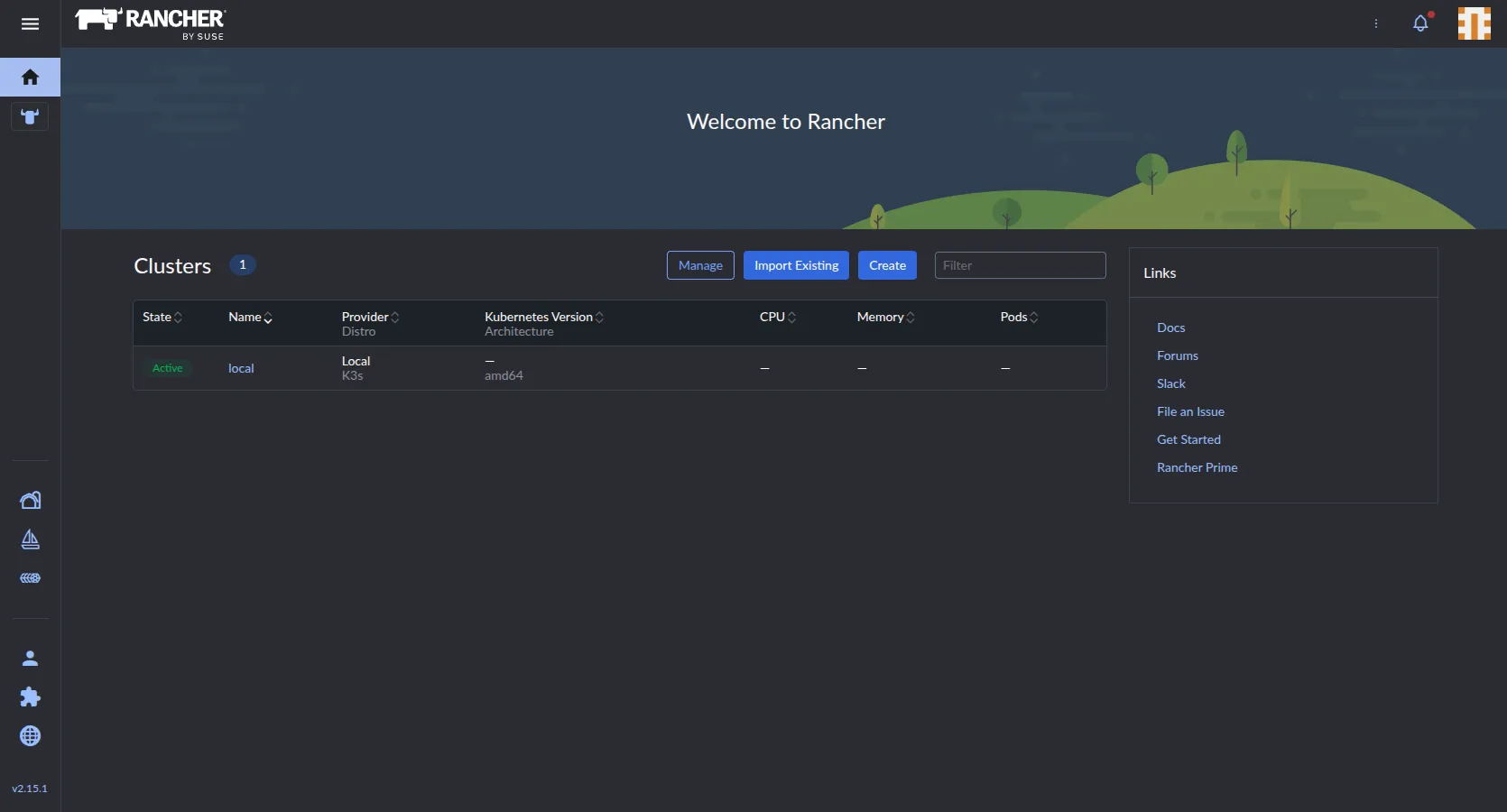
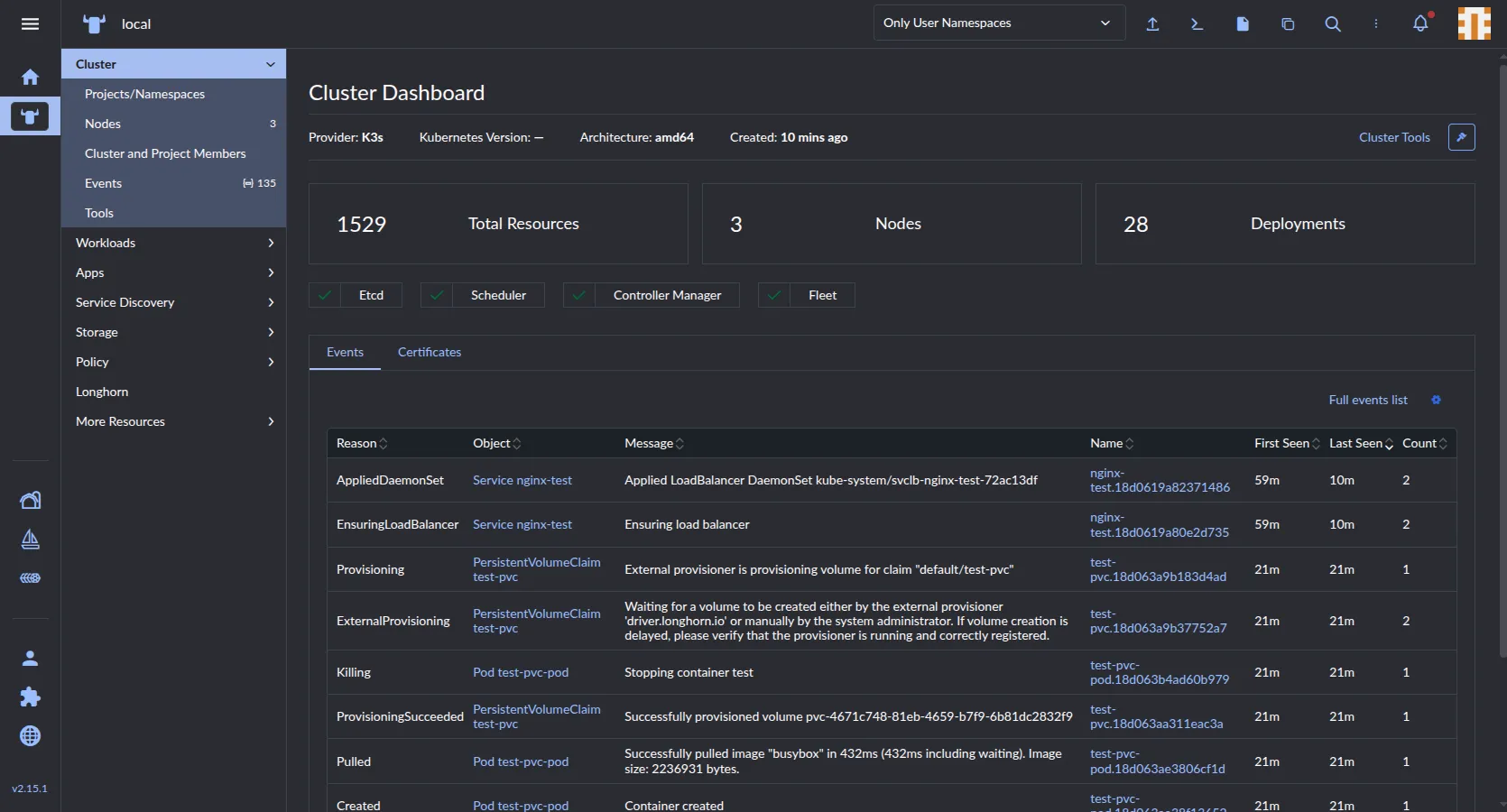
After accepting the EULA and going past the bootstrapping options, I was able to get into the Rancher UI and view the cluster.

6. First real app deployment
I want to deploy authentik for a IDP for apps within the lab, reading the documentation, it does have a Helm Chart, but bundles in a database useful for testing/demo purposes, but not for production, as I want the lab to stand long term, I’ll be using Cloud Native Postgres deployment to create a DB cluster for Authentik.
I’ll install CNPG:
helm repo add cnpg https://cloudnative-pg.github.io/charts
"cnpg" has been added to your repositories

helm repo update
Hang tight while we grab the latest from your chart repositories...
...Successfully got an update from the "longhorn" chart repository
...Successfully got an update from the "cnpg" chart repository
...Successfully got an update from the "rancher-stable" chart repository
...Successfully got an update from the "jetstack" chart repository
...Successfully got an update from the "projectcalico" chart repository
Update Complete. ⎈Happy Helming!⎈

helm install cnpg cnpg/cloudnative-pg -n cnpg-system --create-namespace
AME: cnpg
LAST DEPLOYED: Sun Aug 30 16:52:23 2026
NAMESPACE: cnpg-system
STATUS: deployed
REVISION: 1
TEST SUITE: None
NOTES:
CloudNativePG operator should be installed in namespace "cnpg-system".
You can now create a PostgreSQL cluster with 3 nodes as follows:

cat <<EOF | kubectl apply -f -
# Example of PostgreSQL cluster
apiVersion: postgresql.cnpg.io/v1
kind: Cluster
metadata:
  name: cluster-example

spec:
  instances: 3
  storage:
    size: 1Gi
EOF

kubectl get -A cluster

kubectl get pods -n cnpg-system
NAME                                   READY   STATUS    RESTARTS   AGE
cnpg-cloudnative-pg-7d855d69bb-f2rn4   1/1     Running   0          83s
Now to provision the Database Cluster for Authentik:
apiVersion: postgresql.cnpg.io/v1
kind: Cluster
metadata:
  name: authentik-db
  namespace: authentik
spec:
  instances: 3
  storage:
    size: 10Gi
    storageClass: longhorn
  bootstrap:
    initdb:
      database: authentik
      owner: authentik
      secret:
        name: authentik-db-credentials
---
apiVersion: v1
kind: Secret
metadata:
  name: authentik-db-credentials
  namespace: authentik
type: kubernetes.io/basic-auth
stringData:
  username: authentik
  password: "NOT_FOR_YOU_TO_SEE"
Notice the storageClass option is set to longhorn, the storage system setup earlier for stateful storage across the K3s Cluster.
Apply config and watch DB Cluster create:
kubectl create namespace authentik
namespace/authentik created

kubectl apply -f authentik/authentik-db.yaml
cluster.postgresql.cnpg.io/authentik-db created
secret/authentik-db-credentials created

kubectl get pods -n authentik -w
NAME                          READY   STATUS     RESTARTS   AGE
authentik-db-1-initdb-lqvld   0/1     Init:0/1   0          18s
authentik-db-1-initdb-lqvld   0/1     Init:0/1   0          23s
authentik-db-1-initdb-lqvld   0/1     Init:0/1   0          24s
authentik-db-1-initdb-lqvld   0/1     Init:0/1   0          24s
authentik-db-1-initdb-lqvld   0/1     PodInitializing   0          24s
authentik-db-1-initdb-lqvld   1/1     Running           0          42s
authentik-db-1-initdb-lqvld   0/1     Completed         0          59s
authentik-db-1-initdb-lqvld   0/1     Completed         0          61s
authentik-db-1-initdb-lqvld   0/1     Completed         0          61s
authentik-db-1-initdb-lqvld   0/1     Completed         0          61s
authentik-db-1                0/1     Pending           0          0s
authentik-db-1                0/1     Pending           0          0s
authentik-db-1                0/1     Init:0/1          0          0s
authentik-db-1                0/1     Init:0/1          0          10s
authentik-db-1                0/1     Init:0/1          0          10s
authentik-db-1                0/1     Init:0/1          0          10s
authentik-db-1                0/1     PodInitializing   0          12s
authentik-db-1                0/1     Running           0          12s
authentik-db-1                0/1     Running           0          14s
authentik-db-1                0/1     Running           0          20s
authentik-db-1                1/1     Running           0          21s
authentik-db-2-join-97klg     0/1     Pending           0          0s
authentik-db-2-join-97klg     0/1     Pending           0          0s
authentik-db-2-join-97klg     0/1     Pending           0          2s
authentik-db-2-join-97klg     0/1     Init:0/1          0          2s
authentik-db-2-join-97klg     0/1     Init:0/1          0          24s
authentik-db-2-join-97klg     0/1     Init:0/1          0          24s
authentik-db-2-join-97klg     0/1     Init:0/1          0          28s
authentik-db-2-join-97klg     0/1     PodInitializing   0          28s
authentik-db-2-join-97klg     1/1     Running           0          46s
authentik-db-2-join-97klg     0/1     Completed         0          73s
authentik-db-2-join-97klg     0/1     Completed         0          74s
authentik-db-2-join-97klg     0/1     Completed         0          75s
authentik-db-2-join-97klg     0/1     Completed         0          75s
authentik-db-2                0/1     Pending           0          0s
authentik-db-2                0/1     Pending           0          0s
authentik-db-2                0/1     Init:0/1          0          0s
authentik-db-2                0/1     Init:0/1          0          5s
authentik-db-2                0/1     Init:0/1          0          5s
authentik-db-2                0/1     Init:0/1          0          5s
authentik-db-2                0/1     PodInitializing   0          6s
authentik-db-2                0/1     Running           0          6s
authentik-db-2                0/1     Running           0          11s
authentik-db-2                0/1     Running           0          15s
authentik-db-2                1/1     Running           0          15s
authentik-db-3-join-w6nwh     0/1     Pending           0          0s
authentik-db-3-join-w6nwh     0/1     Pending           0          0s
authentik-db-3-join-w6nwh     0/1     Pending           0          2s
authentik-db-3-join-w6nwh     0/1     Init:0/1          0          2s
authentik-db-3-join-w6nwh     0/1     Init:0/1          0          21s
authentik-db-3-join-w6nwh     0/1     Init:0/1          0          22s
authentik-db-3-join-w6nwh     0/1     Init:0/1          0          36s
authentik-db-3-join-w6nwh     0/1     PodInitializing   0          37s
authentik-db-3-join-w6nwh     1/1     Running           0          55s
authentik-db-3-join-w6nwh     0/1     Completed         0          80s
authentik-db-3-join-w6nwh     0/1     Completed         0          81s
authentik-db-3-join-w6nwh     0/1     Completed         0          81s
authentik-db-3-join-w6nwh     0/1     Completed         0          82s
authentik-db-3                0/1     Pending           0          0s
authentik-db-3                0/1     Pending           0          0s
authentik-db-3                0/1     Init:0/1          0          0s
authentik-db-3                0/1     Init:0/1          0          8s
authentik-db-3                0/1     Init:0/1          0          9s
authentik-db-3                0/1     Init:0/1          0          9s
authentik-db-3                0/1     PodInitializing   0          10s
authentik-db-3                0/1     Running           0          10s
authentik-db-3                0/1     Running           0          15s
authentik-db-3                0/1     Running           0          18s
authentik-db-3                1/1     Running           0          19s
authentik-db-2-join-97klg     0/1     Completed         0          3m14s
authentik-db-1-initdb-lqvld   0/1     Completed         0          4m37s
authentik-db-3-join-w6nwh     0/1     Completed         0          103s
authentik-db-2-join-97klg     0/1     Completed         0          3m14s
authentik-db-3-join-w6nwh     0/1     Completed         0          103s
authentik-db-1-initdb-lqvld   0/1     Completed         0          4m37s
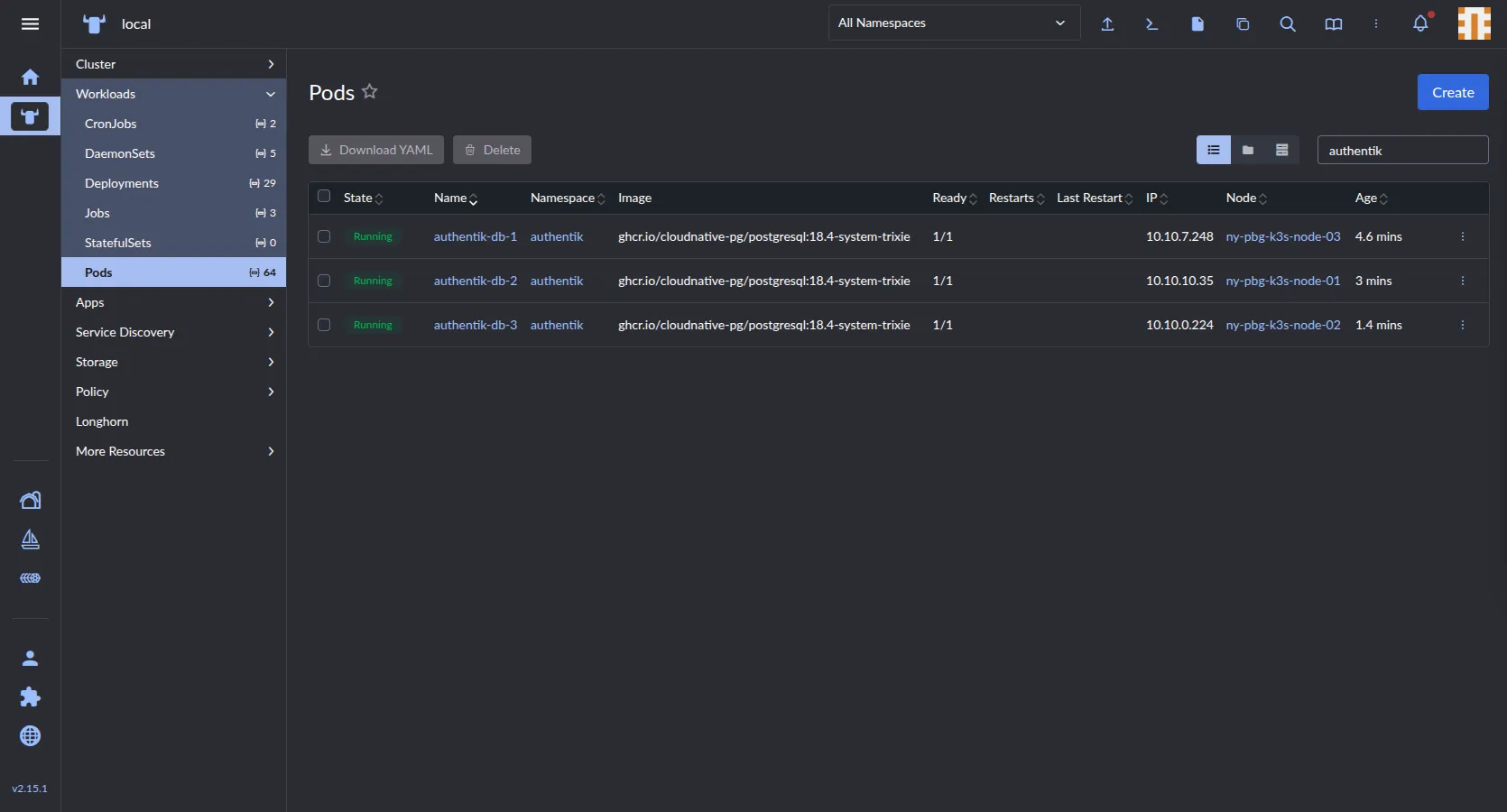
I also could watch the status of the pods real time in Rancher under Workloads>Pods, here’s a screenshot after it has completed:
Confirmed cluster health:
kubectl get clusters.postgresql.cnpg.io -n authentik
NAME           AGE     INSTANCES   READY   STATUS                     PRIMARY
authentik-db   7m59s   3           3       Cluster in healthy state   authentik-db-1

kubectl get svc -n authentik
NAME              TYPE        CLUSTER-IP      EXTERNAL-IP   PORT(S)    AGE
authentik-db-r    ClusterIP   10.43.40.55     <none>        5432/TCP   8m20s
authentik-db-ro   ClusterIP   10.43.208.99    <none>        5432/TCP   8m20s
authentik-db-rw   ClusterIP   10.43.185.174   <none>        5432/TCP   8m20s
Confirmed the disks are replicated across the cluster:
ls -lah /storage/replicas/*
/storage/replicas/pvc-154dede3-5fa6-4a7e-a1ca-a0649db940bf-fc3e0884:
total 357M
drwx------ 2 root root 4.0K Aug 30 16:57 .
drwxr-xr-x 5 root root 4.0K Aug 30 17:00 ..
-rw-r--r-- 1 root root  10G Aug 30 17:08 volume-head-000.img
-rw-r--r-- 1 root root  126 Aug 30 16:57 volume-head-000.img.meta
-rw-r--r-- 1 root root  161 Aug 30 16:57 volume.meta

/storage/replicas/pvc-28f79c3a-11a1-4cc6-8163-3b99f96608d3-0ea00c1b:
total 308M
drwx------ 2 root root 4.0K Aug 30 17:00 .
drwxr-xr-x 5 root root 4.0K Aug 30 17:00 ..
-rw-r--r-- 1 root root  10G Aug 30 17:07 volume-head-000.img
-rw-r--r-- 1 root root  126 Aug 30 17:00 volume-head-000.img.meta
-rw-r--r-- 1 root root  161 Aug 30 17:00 volume.meta

/storage/replicas/pvc-56585e5b-7d15-4a5e-b22d-f925c669c460-d18b7f65:
total 324M
drwx------ 2 root root 4.0K Aug 30 16:59 .
drwxr-xr-x 5 root root 4.0K Aug 30 17:00 ..
-rw-r--r-- 1 root root  10G Aug 30 17:07 volume-head-000.img
-rw-r--r-- 1 root root  126 Aug 30 16:59 volume-head-000.img.meta
-rw-r--r-- 1 root root  161 Aug 30 16:59 volume.meta
Time to deploy Authentik, with default IngressRoute disabled and built-in Postgres disabled:
authentik:
  secret_key: "MY_SECRETS_ARE_NOT_YOURS"
  postgresql:
    host: "authentik-db-rw.authentik.svc.cluster.local"
    name: "authentik"
    user: "authentik"
    password: "NOT_FOR_YOU_TO_SEE"

postgresql:
  enabled: false

server:
  ingress:
    enabled: false

redis:
  enabled: true
  master:
    persistence:
      storageClass: longhorn
helm repo add authentik https://charts.goauthentik.io
"authentik" has been added to your repositories
helm repo update
Hang tight while we grab the latest from your chart repositories...
...Successfully got an update from the "longhorn" chart repository
...Successfully got an update from the "authentik" chart repository
...Successfully got an update from the "cnpg" chart repository
...Successfully got an update from the "rancher-stable" chart repository
...Successfully got an update from the "jetstack" chart repository
...Successfully got an update from the "projectcalico" chart repository
Update Complete. ⎈Happy Helming!⎈
helm install authentik authentik/authentik \
-n authentik \
-f authentik/authentik-values.yaml
NAME: authentik
LAST DEPLOYED: Sun Aug 30 17:16:01 2026
NAMESPACE: authentik
STATUS: deployed
REVISION: 1
TEST SUITE: None
kubectl get pods -n authentik -w
NAME READY STATUS RESTARTS AGE
authentik-db-1 1/1 Running 0 19m
authentik-db-2 1/1 Running 0 18m
authentik-db-3 1/1 Running 0 16m
authentik-server-6cc6c997dc-nlp94 0/1 Running 0 2m42s
authentik-worker-c68bfc448-vpzvx 0/1 Running 0 2m42s
authentik-server-6cc6c997dc-nlp94 0/1 Running 0 3m30s
authentik-server-6cc6c997dc-nlp94 1/1 Running 0 3m31s
authentik-worker-c68bfc448-vpzvx 0/1 Running 0 3m41s
authentik-worker-c68bfc448-vpzvx 1/1 Running 0 3m41sThe service is marked as ready in Rancher, time to create an IngressRoute:
kubectl get svc -n authentik
NAME               TYPE        CLUSTER-IP      EXTERNAL-IP   PORT(S)          AGE
authentik-db-r     ClusterIP   10.43.40.55     <none>        5432/TCP         29m
authentik-db-ro    ClusterIP   10.43.208.99    <none>        5432/TCP         29m
authentik-db-rw    ClusterIP   10.43.185.174   <none>        5432/TCP         29m
authentik-server ClusterIP 10.43.175.7 <none> 80/TCP,443/TCP 11mapiVersion: traefik.io/v1alpha1
kind: IngressRoute
metadata:
name: authentik-ui
namespace: authentik
spec:
entryPoints:
- web
- websecure
routes:
- match: Host(`idp.k3s-lab.homeblab.com`)
kind: Rule
services:
- name: authentik-server
port: 80kubectl apply -f authentik/authentik-ingressroute.yaml
ingressroute.traefik.io/authentik-ui createdVisiting https://idp.k3s-lab.homeblab.com gets me to the Authentik setup page, it does not redirect to HTTPS by default, I’ll delete the old Ingress Route and create a new one to redirect to HTTPS automatically
kubectl delete ingressroute authentik-ui -n authentik
ingressroute.traefik.io "authentik-ui" deleted from authentik namespaceapiVersion: traefik.io/v1alpha1
kind: Middleware
metadata:
name: redirect-https
namespace: authentik
spec:
redirectScheme:
scheme: https
permanent: true
---
apiVersion: traefik.io/v1alpha1
kind: IngressRoute
metadata:
name: authentik-ui-http
namespace: authentik
spec:
entryPoints:
- web
routes:
- match: Host(`idp.k3s-lab.homeblab.com`)
kind: Rule
services:
- name: authentik-server
port: 80
middlewares:
- name: redirect-https
---
apiVersion: traefik.io/v1alpha1
kind: IngressRoute
metadata:
name: authentik-ui-https
namespace: authentik
spec:
entryPoints:
- websecure
routes:
- match: Host(`idp.k3s-lab.homeblab.com`)
kind: Rule
services:
- name: authentik-server
port: 80kubectl apply -f authentik/authentik-ingressroute.yaml
middleware.traefik.io/redirect-https created
ingressroute.traefik.io/authentik-ui-http created
ingressroute.traefik.io/authentik-ui-https createdNow visiting Authentik via HTTP always redirects to HTTPS.
And now a PVC for storing Media like backgrounds and logos:
apiVersion: v1
kind: PersistentVolumeClaim
metadata:
  name: authentik-media-pvc
  namespace: authentik
spec:
  accessModes:
    - ReadWriteOnce
  storageClassName: longhorn
  resources:
    requests:
      storage: 1Gi
kubectl apply -f authentik/authentik-pvc.yaml
persistentvolumeclaim/authentik-media-pvc created
kubectl get pvc -n authentik
NAME STATUS VOLUME CAPACITY ACCESS MODES STORAGECLASS VOLUMEATTRIBUTESCLASS AGE
authentik-db-1 Bound pvc-154dede3-5fa6-4a7e-a1ca-a0649db940bf 10Gi RWO longhorn <unset> 91m
authentik-db-2 Bound pvc-56585e5b-7d15-4a5e-b22d-f925c669c460 10Gi RWO longhorn <unset> 89m
authentik-db-3 Bound pvc-28f79c3a-11a1-4cc6-8163-3b99f96608d3 10Gi RWO longhorn <unset> 88m
authentik-media-pvc Bound pvc-7cfce7d9-58ab-4bcb-ac7a-c13db2e61358 1Gi RWO longhorn <unset> 18sAdjust the server: section in the values file:
authentik:
  secret_key: ""
  postgresql:
    host: "authentik-db-rw.authentik.svc.cluster.local"
    name: "authentik"
    user: "authentik"
    password: ""
  storage:
    backend: file

postgresql:
  enabled: false

server:
  securityContext:
    fsGroup: 1000
  ingress:
    enabled: false
  volumes:
    - name: media
      persistentVolumeClaim:
        claimName: authentik-media-pvc
  volumeMounts:
    - name: media
      mountPath: /data
  strategy:
    type: Recreate

redis:
  enabled: true
  master:
    persistence:
      storageClass: longhorn
7. Generating a self signed CA cert for Traefik
apiVersion: cert-manager.io/v1
kind: ClusterIssuer
metadata:
  name: selfsigned-bootstrap
spec:
  selfSigned: {}
---
apiVersion: cert-manager.io/v1
kind: Certificate
metadata:
  name: homeblab-root-ca
  namespace: cert-manager
spec:
  isCA: true
  commonName: homeblab-root-ca
  secretName: homeblab-root-ca-secret
  duration: 87600h
  issuerRef:
    name: selfsigned-bootstrap
    kind: ClusterIssuer
---
apiVersion: cert-manager.io/v1
kind: ClusterIssuer
metadata:
  name: homeblab-ca-issuer
spec:
  ca:
    secretName: homeblab-root-ca-secret
kubectl apply -f cert/homeblab-ca.yaml
clusterissuer.cert-manager.io/selfsigned-bootstrap created
certificate.cert-manager.io/homeblab-root-ca created
clusterissuer.cert-manager.io/homeblab-ca-issuer created
kubectl get certificate -n cert-manager
NAME READY SECRET AGE
homeblab-root-ca True homeblab-root-ca-secret 19sapiVersion: cert-manager.io/v1
kind: Certificate
metadata:
name: wildcard-k3s-lab
namespace: kube-system
spec:
secretName: wildcard-k3s-lab-tls
issuerRef:
name: homeblab-ca-issuer
kind: ClusterIssuer
dnsNames:
- "*.k3s-lab.homeblab.com"
- "k3s-lab.homeblab.com"kubectl apply -f cert/homeblab-wc-cert.yaml
certificate.cert-manager.io/wildcard-k3s-lab created
kubectl get certificate -n kube-system
NAME READY SECRET AGE
wildcard-k3s-lab True wildcard-k3s-lab-tls 23spiVersion: traefik.io/v1alpha1
kind: TLSStore
metadata:
name: default
namespace: kube-system
spec:
defaultCertificate:
secretName: wildcard-k3s-lab-tlskubectl apply -f cert/traefik.yaml
tlsstore.traefik.io/default created