NUT Setup on a Raspberry Pi
Overview
I want to monitor my 2 APC UPSes in my rack that are not network based, I have taken the units out of service that had NMC cards, but these UPSes have USB ports on them.
Setting up NUT
I put a Raspberry Pi running Ubuntu Server in the rack on a shelf, directly connected to the data ports on the UPSes and installed NUT:
sudo apt install nut -yI can scan for connected UPSes via nut-scanner:
sudo nut-scanner
...
Scanning USB bus.
No IP range(s) requested, skipping NUT bus (old libupsclient connect method)
Scanning NUT simulation devices.
[nutdev-usb1]
        driver = "usbhid-ups"
        port = "auto"
        vendorid = "051D"
        productid = "0002"
        product = "Back-UPS NS 1500M2 FW:957.e5 .D USB FW:e5"
        serial = "0BXXXXXXXXXX"
        vendor = "American Power Conversion"
        # bus = "001"
        # device = "004"
        # busport = "004"
[nutdev-usb2]
        driver = "usbhid-ups"
        port = "auto"
        vendorid = "051D"
        productid = "0002"
        product = "Back-UPS NS 1500M2 FW:957.e5 .D USB FW:e5"
        serial = "0BXXXXXXXXXX"
        vendor = "American Power Conversion"
        # bus = "001"
        # device = "003"
        # busport = "003"
I copied device stanzas listed from nut-scanner directly into /etc/nut/ups.conf
I had to create a udev rule so the driver could access the device at /etc/udev/rules.d/50-nut-ups.rules:
SUBSYSTEM=="usb", ATTR{idVendor}=="051D", ATTR{idProduct}=="0002", MODE="664", GROUP="nut"And applied them:
sudo udevadm control --reload-rules
sudo udevadm trigger
Now I could query the UPSes:
sudo upsc nutdev-usb1
Init SSL without certificate database
battery.charge: 100
battery.charge.low: 10
battery.charge.warning: 50
battery.date: 2001/09/25
battery.mfr.date: 2025/12/06
battery.runtime: 990
battery.runtime.low: 120
battery.type: PbAc
battery.voltage: 27.4
battery.voltage.nominal: 24.0
device.mfr: American Power Conversion
device.model: Back-UPS NS 1500M2
device.serial: 0BXXXXXXXXXX
device.type: ups
driver.debug: 0
driver.flag.allow_killpower: 0
driver.name: usbhid-ups
driver.parameter.interrupt_pipe_no_events_tolerance: -1
driver.parameter.pollfreq: 30
driver.parameter.pollinterval: 2
driver.parameter.port: auto
driver.parameter.product: Back-UPS NS 1500M2 FW:957.e5 .D USB FW:e5
driver.parameter.productid: 0002
driver.parameter.serial: 0BXXXXXXXXXX
driver.parameter.synchronous: auto
driver.parameter.vendor: American Power Conversion
driver.parameter.vendorid: 051D
driver.state: quiet
driver.version: 2.8.4
driver.version.data: APC HID 0.100
driver.version.internal: 0.67
driver.version.usb: libusb-1.0.29 (API: 0x0100010B)
input.sensitivity: medium
input.transfer.high: 142
input.transfer.low: 88
input.transfer.reason: input voltage out of range
input.voltage: 123.0
input.voltage.nominal: 120
ups.beeper.status: enabled
ups.delay.shutdown: 20
ups.firmware: 957.e5 .D
ups.firmware.aux: e5
ups.load: 36
ups.mfr: American Power Conversion
ups.mfr.date: 2025/12/06
ups.model: Back-UPS NS 1500M2
ups.productid: 0002
ups.realpower.nominal: 900
ups.serial: 0B2549L39063
ups.status: OL
ups.test.result: No test initiated
ups.timer.reboot: 0
ups.timer.shutdown: -1
ups.vendorid: 051d
Notifications
I want to be notified as soon as NUT detects a change in power delivery. I have a self-hosted Ntfy.sh instance, which my phone receives.
I created a script at /bin/ups-script.sh:
!/bin/bash
case $1 in
    on-battery)
        curl \
            -H "Priority: 5" \
            -H "Title: 🪫 A UPS is on Battery [NUT]" \
            -u user:pass \
            -d "A UPS is on Battery Power." \
            https://myntfyhost/alerts-networkinfra
            ;;
    online)
        curl \
            -H "Priority: 5" \
            -H "Title: 🔋 A UPS is no longer on Battery [NUT]" \
            -u user:pass \
            -d "A UPS is no longer on battery power." \
            https://myntfyhost/alerts-networkinfra
            ;;
esac
Testing the script:
sudo chmod +x /bin/ups-script.sh

ups-script.sh online
{"id":"a7f8b6h7E7dr","time":1789693523,"expires":1789736723,"event":"message","topic":"alerts-networkinfra","title":"🔋 A UPS is no longer on Battery [NUT]","message":"A UPS is no longer on battery power.","priority":5}

ups-script.sh on-battery
{"id":"PyD6rHSKrBps","time":1789693623,"expires":1789736823,"event":"message","topic":"alerts-networkinfra","title":"🪫 A UPS is on Battery [NUT]","message":"A UPS is on Battery Power.","priority":5}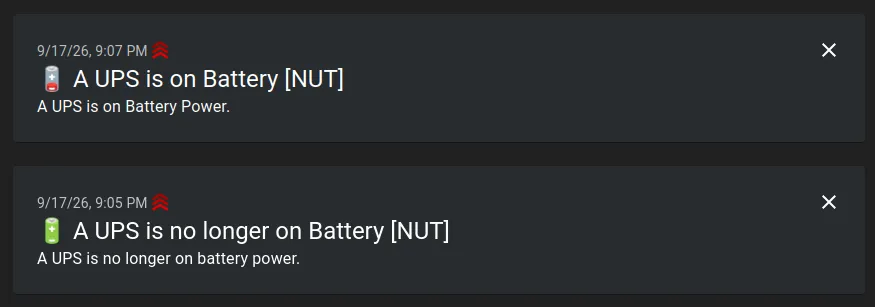
Added the following to /etc/nut/upssched.conf:
PIPEFN /var/run/nut/upssched.pipe
LOCKFN /var/run/nut/upssched.lock
CMDSCRIPT /bin/ups-script.sh
AT ONBATT * EXECUTE on-battery
AT ONLINE * EXECUTE online
I’ve mostly taken inspiration from this Stack Exchange reply for the script.
Created a upsd user in /etc/nut/upsd.users:
[monitor]
    password = secretPassword123
    upsmon master
Added monitor lines to /etc/nut/ups.conf:
NOTIFYCMD /usr/sbin/upssched
NOTIFYFLAG ONLINE       SYSLOG+WALL+EXEC
NOTIFYFLAG ONBATT       SYSLOG+WALL+EXEC
MONITOR nutdev-usb1@localhost 1 monitor secretPassword123 master
MONITOR nutdev-usb2@localhost 1 monitor secretPassword123 master
Restarted the NUT services:
sudo systemctl restart nut-server nut-monitorTesting notifications:
sudo UPSNAME=nutdev-usb1@localhost NOTIFYTYPE=ONBATT upssched ONBATT
{"id":"2H7EQZ4vROES","time":1789694704,"expires":1789737904,"event":"message","topic":"alerts-networkinfra","title":"🪫 A UPS is on Battery [NUT]","message":"A UPS is on Battery Power.","priority":5}

sudo UPSNAME=nutdev-usb1@localhost NOTIFYTYPE=ONLINE upssched ONLINE
{"id":"cJcUjjMs4S2f","time":1789694810,"expires":1789738010,"event":"message","topic":"alerts-networkinfra","title":"🔋 A UPS is no longer on Battery [NUT]","message":"A UPS is no longer on battery power.","priority":5}
The notifications came through.
Testing manually by disconnecting and reconnecting the UPS from grid power did trip both notifications.
Automatic shutdown
I won’t be doing automatic shutdown yet. I am going to improve the script to pass some more info through the notification before I do any sort of remote shutdown of equipment.