In my last post in this series of posts I setup the overlay network that is resilient up to a (residential) ISP failure.
This post will be focused on spinning up 4 Technitium DNS servers, two at each site, with Anycast abilities to withstand a site (or ISP) failure. The Technitium cluster will be authoritative name servers for a few domains, soon to include this one, as a goal to completely control and self host all of my infrastructure.
Architecture
Provisioning Technitium DNS
This part is pretty straightforward, I’ve done it plenty of times before, but I’ll cover it:
...Technitium DNS Server was installed successfully!Open http://adns-01:5380/ to access the web console.Donate! Make a contribution by becoming a Patron: https://www.patreon.com/technitium
Provisioning Service & Anycast IPs
We’ll assign each server a regular service IP and a reused anycast IP address, the regular service IPs will be used for clustering.
Install pre-reqs:
sudo apt install bird2 -y
Virtual Interface setup:
Service IP setup:
Each host will get a unique service IP for cluster communication:
3: svc0: <BROADCAST,NOARP,UP,LOWER_UP> mtu 1500 qdisc noqueue state UNKNOWN group default qlen 1000 link/ether xx:xx:xx:xx:xx:xx brd ff:ff:ff:ff:ff:ff inet 10.98.0.x/32 scope global svc0 valid_lft forever preferred_lft forever4: svc1: <BROADCAST,NOARP,UP,LOWER_UP> mtu 1500 qdisc noqueue state UNKNOWN group default qlen 1000 link/ether xx:xx:xx:xx:xx:xx brd ff:ff:ff:ff:ff:ff inet 10.98.0.15/32 scope global svc1 valid_lft forever preferred_lft forever
Bird setup
Configuration at /etc/bird/bird.conf:
router id 10.255.0.x;protocol device {}protocol direct services { ipv4; interface "svc*";}protocol bgp fortigate { local as 65400; neighbor 10.254.254.4 as 65400; multihop; # password "password here if used"; ipv4 { import none; export where proto = "services"; };}protocol static svc_route { ipv4; route 10.98.0.0/24 recursive 10.254.254.4;}protocol kernel { learn; ipv4 { import all; export filter { if proto = "svc_route" then { krt_prefsrc = 10.98.0.x; accept; } reject; }; };}
x is the last service IP octet value
svc* wildcard used to match all service IP virtual interfaces
protocol device {} had to be added on the newer Ubuntu versions, they do not have a default config, otherwise Bird will install a unreachable route into the FIB
The neighbor group ranges on the FortiGates were adjusted to accommodate the networks which the servers sit on.
At this point, we should see the neighbors advertising both their regular service IPs and anycast service IPs (one site shown for simplicity):
I also setup iBGP multipath on the FortiGates:
config router bgp set ibgp-multipath enableend
I also had to set the route map on the CR to use the loopback IP for testing:
! Use CR loopback as the source for traffic the CR originates over BGP routesroute-map RM-SET-SRC permit 10 set src 10.99.0.0exit!ip protocol bgp route-map RM-SET-SRC
We can see the routes automatically installed on the CR:
ip route
10.98.0.15 nhid 144 proto bgp src 10.99.0.0 metric 20 nexthop via 10.99.1.1 dev xfrm-site-a weight 1 nexthop via 10.99.1.3 dev xfrm-site-b weight 1 10.98.0.16 nhid 143 via 10.99.1.1 dev xfrm-site-a proto bgp src 10.99.0.0 metric 20 10.98.0.17 nhid 143 via 10.99.1.1 dev xfrm-site-a proto bgp src 10.99.0.0 metric 20 10.98.0.18 nhid 145 via 10.99.1.3 dev xfrm-site-b proto bgp src 10.99.0.0 metric 20 10.98.0.19 nhid 145 via 10.99.1.3 dev xfrm-site-b proto bgp src 10.99.0.0 metric 20
and changing the ECMP mode to port based hashing on the CR (for testing):
sysctl -w net.ipv4.fib_multipath_hash_policy=1
We can test Anycast routing by sending DNS requests and monitoring network traffic on two of the servers at each site:
Only two servers shown here because the FortiGate’s ECMP modes are currently set to the default (source-ip-based), so those requests will likely never reach the 2nd server coming from the CR IP.
Setting the ECMP setting back on the CR:
sysctl -w net.ipv4.fib_multipath_hash_policy=0
Technitium DNS Clustering Setup
After confirming firewall policies exist for service IP to service IP communication, we are ready to cluster the four Technitium DNS servers.
I won’t be going into databases for logging in this post, but within the next few posts, I do want those to be highly available as well.
Clustering:
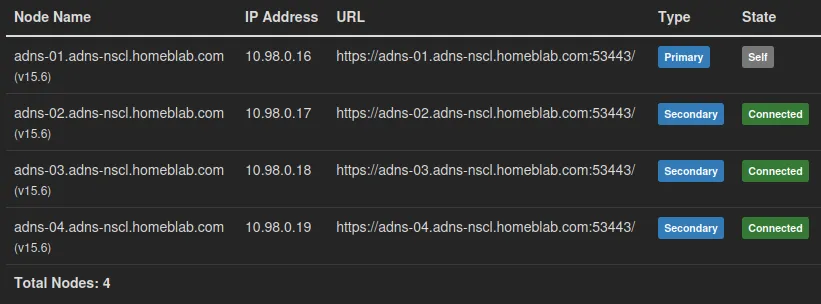
I formed a cluster on adns-01 with its primary IP address being the service IP that is unique to each server, so in this case it was 10.98.0.16
Each cluster node was joined with the same setup:
Zone setup and nameserver swap
At this point, our authoritative name servers are ready, we need to create a DNS zone for the domains we want to answer DNS requests for.
I created a primary zone for my domain and recreated my existing DNS records, ensuring to include a “deny all” spf record, which somehow was not there before.
After that was completed, I went to my domain registrar’s management page and created name server records to point to the ingress IP of the CR.
That’s pretty much the setup for hosting the authoritative name servers for the domain behind a bgp anycast setup.
Going a step further
I’d like to go a step further and ensure that both the regular service IP and anycast IP route are withdrawn in case the DNS server crashes, as it would potentially leave 1/4 of DNS requests failing if a single server failure were to occur.
“Service to check the service”
I figured the best way to accomplish these service checks is to have a service that just queries the server’s anycast IP via DNS (which is local, if queried locally, as long as the svc1 interface isn’t brought down) that could call either:
birdc disable service_dns_anycast
or
birdc enable service_dns_anycast
Which would require separating out the protocols into two, one for the regular service IP and the anycast service IP:
protocol direct service_dns { ipv4; interface "svc0";}protocol direct service_dns_anycast { ipv4; interface "svc1"; # disabled by default until we confirm service is up disabled;}protocol bgp fortigate { local as 65400; neighbor 10.254.254.4 as 65400; multihop; ipv4 { import none; export where proto = "service_dns" || proto = "service_dns_anycast" ; };}
A script at /usr/local/bin/service-health:
#!/bin/bash# Announce a service IP only while the service answers.RISE=3 # consecutive passes before announcingFALL=2 # consecutive failures before withdrawingINTERVAL=5 # seconds between checksok=0; bad=0; state=downwhile true; do if timeout 3 sh -c "$CHECK" >/dev/null 2>&1; then ok=$((ok + 1)); bad=0 else bad=$((bad + 1)); ok=0 fi if [ "$ok" -ge "$RISE" ] && [ "$state" = down ]; then state=up; logger -t service-health "$PROTO healthy, announcing" elif [ "$bad" -ge "$FALL" ] && [ "$state" = up ]; then state=down; logger -t service-health "$PROTO failing, withdrawing" fi # Reapply every loop, so a bird restart can never leave the wrong state if [ "$state" = up ]; then birdc enable "$PROTO" >/dev/null else birdc disable "$PROTO" >/dev/null; fi sleep "$INTERVAL"done
chmod +x /usr/local/bin/service-health
A systemd unit at /etc/systemd/system/service-health@.service:
[Unit]Description=Health check for %iAfter=bird.serviceWants=bird.service[Service]EnvironmentFile=/etc/service-health/%i.confExecStart=/usr/local/bin/service-healthRestart=always[Install]WantedBy=multi-user.target
And an EnvironmentFile for the service check at /etc/service-health/dns_anycast.conf:
PROTO=service_dns_anycastCHECK=dig +time=2 +tries=1 +short @10.98.0.15 homeblab.com SOA
Applying it almost instantly brought up the service.
What does this look like?
It’s a bit complicated to diagram, but here’s a simple one that hopefully gets the point across:
Conclusion
We have built an authoritative DNS name server cluster that uses BGP anycast addresses to achieve high availability, including service failure detection and automatic anycast IP route withdrawal.