Zabbix Testing and Deployment
Overview
I have spun up Zabbix for evaluation again.. and I plan to put it into production monitoring most of the network.
Rollout with Ansible using Passive Agents
On the Ansible host:
ansible-galaxy collection install community.zabbixDue to the current version not referencing compatibility for Ubuntu 26, Debain 12 & 13 (as of writing, pending PR approval in GitHub), I have to create an override to allow Zabbix agent to install on Ubuntu 26 hosts.
In zabbix_overrides.yml in the same directory as my playbook:
zabbix_valid_agent_versions:
  "26": [7.4, 7.2, 7.0, 6.4, 6.0]
  "24": [7.4, 7.2, 7.0, 6.4, 6.0]
  "22": [7.4, 7.2, 7.0, 6.4, 6.0]
  "13": [7.4, 7.2, 7.0]
  "12": [7.4, 7.2, 7.0, 6.4, 6.0]
And a new play in the playbook:
- name: Install and configure Zabbix Agent
  hosts: all
  become: true
  roles:
    - role: community.zabbix.zabbix_agent
Creating variables for Zabbix server information in group_vars/all/vars.yml:
zabbix_agent2: true
zabbix_agent_server: "my.zabbix.server"
zabbix_agent_serveractive: "my.zabbix.server"
zabbix_agent_hostmetadata: "linux-servers"
zabbix_agent_version: "7.4"

zabbix_api_server_url: "http://my.zabbix.server"
zabbix_api_login_user: "ansible-automation"
zabbix_api_login_pass: "{{ vault_zabbix_api_password }}"

zabbix_host_groups:
  - "Linux servers"

zabbix_agent_link_templates:
  - "Linux by Zabbix agent"
New variables file for mixed IP/DNS configuration at group_vars/all/zabbix_interface.yml:
--
zabbix_agent_address: "{{ ansible_host | default(ansible_default_ipv4.address) }}"
zabbix_agent_address_is_ip: "{{ zabbix_agent_address is match('^[0-9]{1,3}(\\.[0-9]{1,3}){3}$') }}"

zabbix_agent_interfaces:
  - type: 1
    main: 1
    useip: "{{ 1 if zabbix_agent_address_is_ip else 0 }}"
    ip: "{{ zabbix_agent_address if zabbix_agent_address_is_ip else '' }}"
    dns: "{{ '' if zabbix_agent_address_is_ip else zabbix_agent_address }}"
    port: "10050"
I had to have this logic because I have a mix of IP and DNS inventory in Ansible.
Now created a User role in Zabbix:
Users > User roles > Create user role
Name: Ansible Automation
User type: Admin
Under Access to API:
Add the following API methods to the allow list:
host.gethost.createhost.updatehostgroup.gettemplate.gethostinterface.gethostinterface.updatehostinterface.create
Create new user under Users>Users>Create user:
Username: ansible-automation
Password: Randomly generated password
Under permissions:
Role: Ansible Automation
On the Ansible machine, add the password to the vault via variable name vault_zabbix_api_password.
Add a user group under Users>User groups>Create user group:
Group name: Ansible Automation
Under Template Permissions:
Add new row, select all templates, select Read
Under Host permissions:
Add new row, select all, select Read-write then click Add
Add the user to the group.
Ensure that the user has the correct effective permissions:
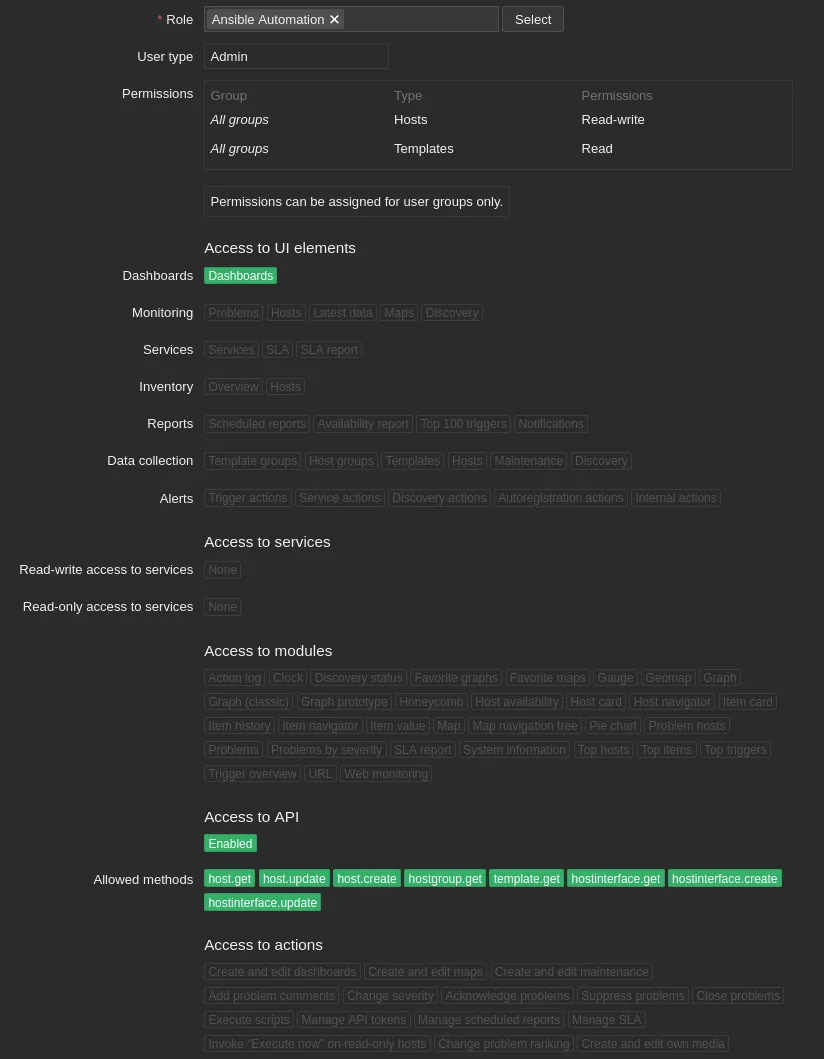
Testing the Ansible playbook
Testing the Ansible playbook required adding those overwritten variables to be explicitly added to the command:
ansible-playbook -i inventory.ini playbook.yml --ask-vault-pass --limit ansible-01 -K -e @zabbix_overrides.ymlAfter running, the host popped into Zabbix and started collecting data:

Removing the --limit argument allowed me to install it on all of the hosts in the inventory file.
Monitoring other systems
I want to monitor as much network infrastructure as possible on systems which do not support agents.
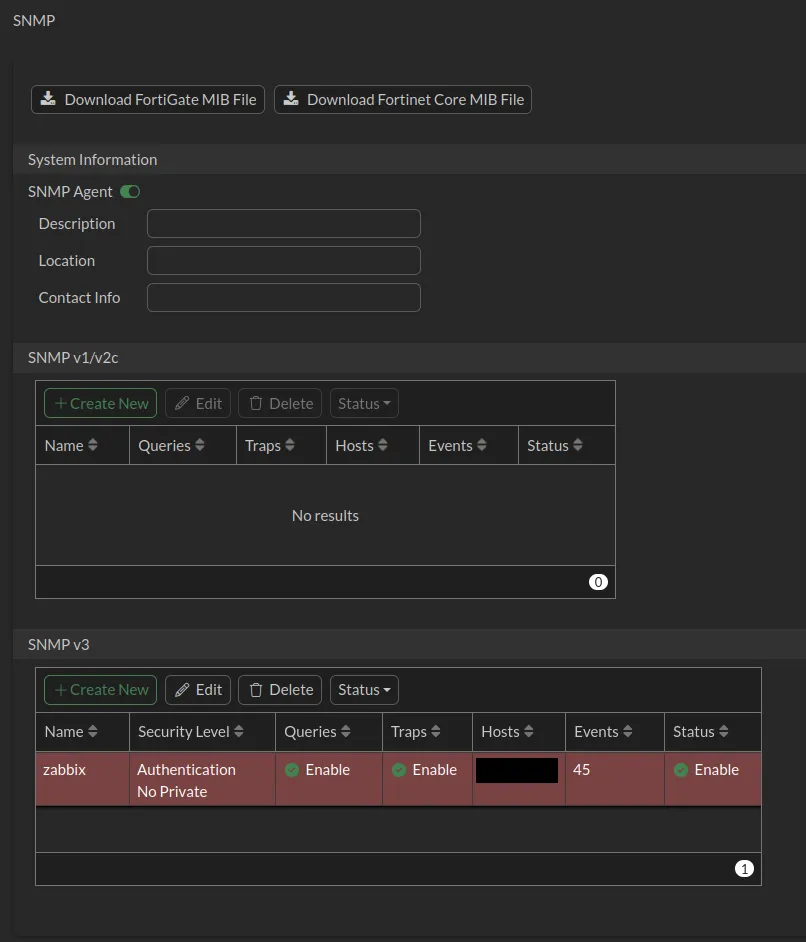
I won’t setup SNMP v3 Privacy in this, I will continue with SNMP v3 Auth however.
FortiGate
First test is going to be the FortiGate sitting in the rack.
I turned on the SNMP access on the interface that Zabbix is sitting on, I could do this on a loopback interface but I’ll keep it simple for now.
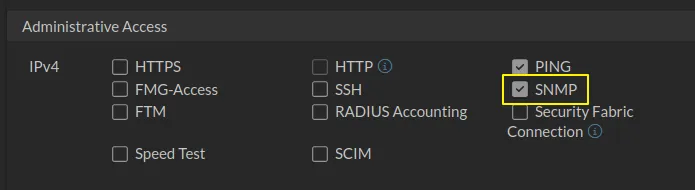
I created a host group in Zabbix called “Network infrastructure”
Setup SNMPv3 on the FortiGate:
And the configuration in Zabbix:
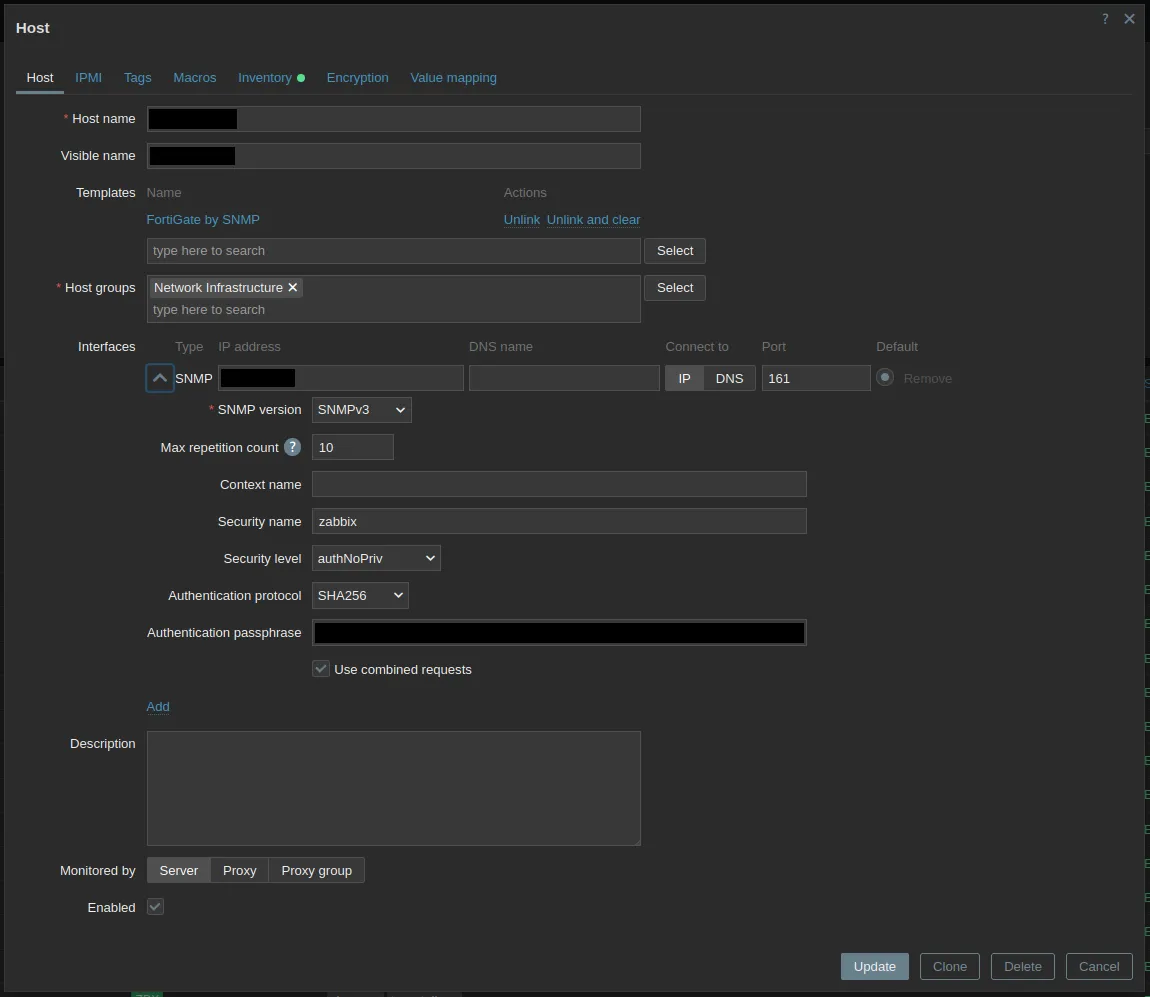
Cisco Switch
I have a few Cisco switches around, I’ll be them into Zabbix too.
Configuration on the switch:
laundry-room-sw-01#conf t
Enter configuration commands, one per line.  End with CNTL/Z.
laundry-room-sw-01(config)#snmp-server view ZabbixView iso included
laundry-room-sw-01(config)#snmp-server group ZabbixGroup v3 auth read ZabbixView
laundry-room-sw-01(config)#snmp-server user ZabbixUser ZabbixGroup v3 auth sha <auth password>
laundry-room-sw-01(config)#end
laundry-room-sw-01#wr mem
Building configuration...
[OK]
And the configuration within Zabbix uses the Cisco IOS template.
Other devices
I have some other devices like UniFi switches, APs, FortiSwitch and FortiAP but I will skip those in this for now.